New Features in Google Classroom

Standard

As of mid August the following in now possible in Classroom:

  • Guardian summaries: Teachers and administrators can invite guardians to sign up for email summaries to keep up with their students. Guardians can choose how often to get a summary—daily or weekly—and can unsubscribe at any time. Summaries include a student’s missing or upcoming work as well as new announcements and questions posted by teachers in the class stream.

  • Topics for stream organization: Teachers can organize the class stream by adding topics to posts. Teachers and students can filter the stream by topic.

  • Teachers and students can preview materials attached to assignments or posts.

  • Teachers and students can view email notifications by class using Inbox by Gmail. Important updates from recent emails are highlighted in each bundle.

  • Teachers can add a subject when creating a class. (What’s New in Classroom Blog)

FYI-Student Tablet Rollin Info

Standard

Information for students has now been posted (grade 9-11 & 12) regarding tablet return.  Thanks for helping students complete (Gr. 9 still to come) road check activities in advisory to co-design their device specific independence, and for your continued efforts to support device independent means of completing course work and communication.

Zaption

Standard

Zaption is a means for making videos interactive and a strong tool for your mastery learning tool kit that will be available to us by the end of the week. Check it out and ask Cathleen D, Sean M or Jason W to see how they is using it with Science and Econ Videos. Also here is a great tips sheet from a techy science teacher at ASB, Rory Newcomb.


Gamify Learning Extensions

Standard

Helping to guide students from good to great, a 5 to a 6, a 3 to a 5 etc. is tricky and resource intense.  Below are three examples below that leverage the power to gamification worth checking out:

Vocab.com as I have previously shared  is one way to gamify  subject specific vocab.  Ask your ELL or English colleagues if you would like insight into how it’s being used at ZIS.

Quizup goes beyond Quizlet in that it matches individuals up in real time to compete in their knowledge of a selected topic..need more convincing… check out an IB Bio teacher at ASB’s experience.


Evolution of Edtech at the Upper School- Update

Standard

This year we have a lot of exploration to be done related to educational technology shifts.  All exploration is aimed at streamlining communication and ensuring an agile digital ecosystem, so we can focus on the real goods….forward thinking pedagogy!

Starting in June some of our colleagues (thx- Adrian, Ali, Claudia S, Diya, Geoff, Ian, Jason, Marie & Will) have explored Google Classroom to support blended learning in one or more of their classes.  Their efforts have allowed this platform to be explored in our digital ecosystem producing the following findings.

Our next steps is to continue with early adoption of Google Classroom and start piloting SMART amp.  SMART amp is a cloud based version of SMART notebook that saves automatically in your Google Drive.

If you are interested in piloting SMART amp or adopting Google Classroom please email Liz before the end of this week (Friday 25th).
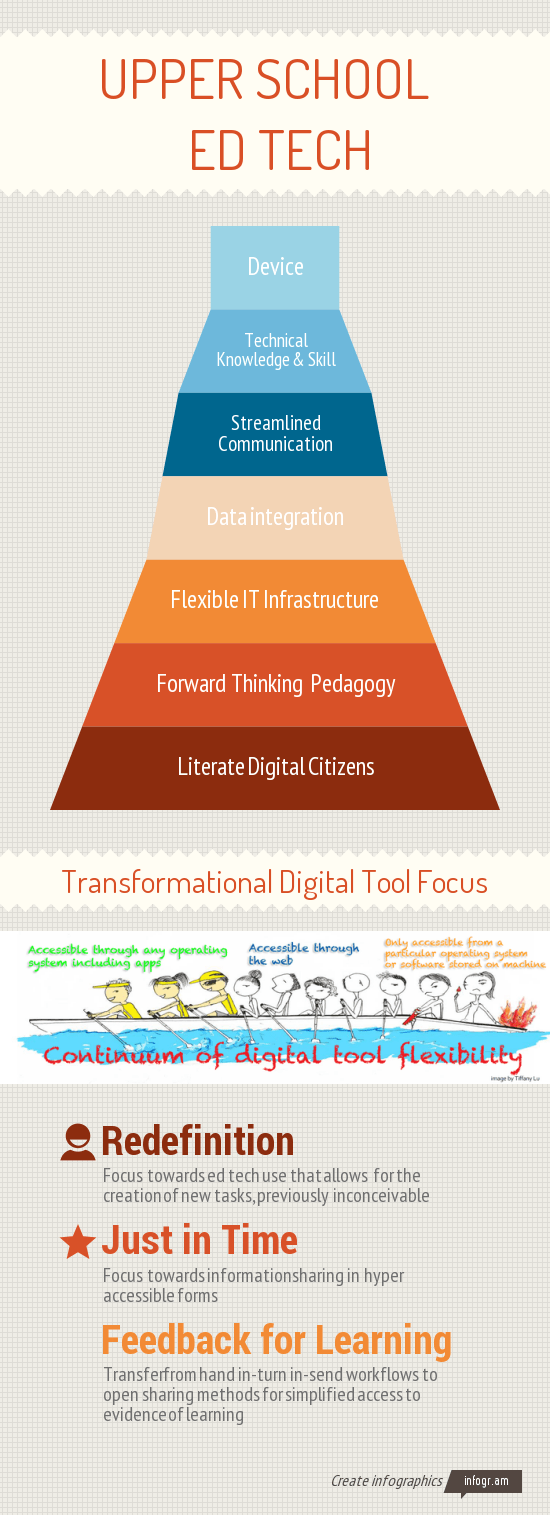
US Ed Tech Infographic 14_15 focus


To the left is the graphic that summarizes the findings from the 1-to-1 device cycle three research that points to all things beyond the device.  Below is a summary of our Upper School ed tech evolution over the past four years.

2011-12
1-to-1 cycle 2 year 1 (x220), iPad pilot , scaling screencasting and digital portfolios, and desktop research.

2012-13
Start of 1-to-1 device cycle three research,  SMART board/projector research, mobile phone wifi connection, and start of PBL work w/ Suzie Boss

2013-14
1-to-1 device cycle three research, continued PBL work w/ Suzie- including the fail festival, and Moodle upgrade

2014-15
1-to-1 cycle 3 year 1 (Yoga), Suzie Boss PBL work, Fine Arts digital ecosystem research, Gmail, and retirement of network drives (Classwork)

2015-16
Start of cycle 3 (iMac labs for visual arts), Google Classroom and SMART amp pilots, continued work with Suzie Boss, and start of 1-to-1 cycle 4 research



Digitally Efficient Ways to Check for Understanding

Standard

Interactive writing is one of the elements listed on Wes Fryer’s digital media creation grid I shared last week.  At ZIS Upper School some of our most efficient digital tools for interactive writing are:

  • Student digital portfolios
  • Google apps (docs, spreadsheets, presentations, etc) shared as anyone with the link can edit
  • Moodle discussion forums
  • Padlet walls

Screen Shot 2014-11-11 at 9.57.31 AM

These are all great digital tools, but in an of themselves they do not get at what’s needed most, quick, appropriate, timely feedback!  However, pair one of these digital tools with the right method for checking for understanding, and you and your students are on the road to formative assessment bliss.  I use the word bliss purposefully, because what most teachers and students want to avoid at all costs is the opposite:)

If you need some ideas check out this comprehensive list of 53 ways to check for understanding from Edutopia.

Tech Tools for Student Creation

Standard

As students are given more and more choice over how to display their learning, we need to think as an Upper School faculty about the avenues they are choosing.

Here is a simple map from Wesley Fryer that outlines some of the possible ways students create digital works.

CREATE

Add a comment to grown the list of tools, and examples in each section.