
SMART Notebook Expiration

Standard

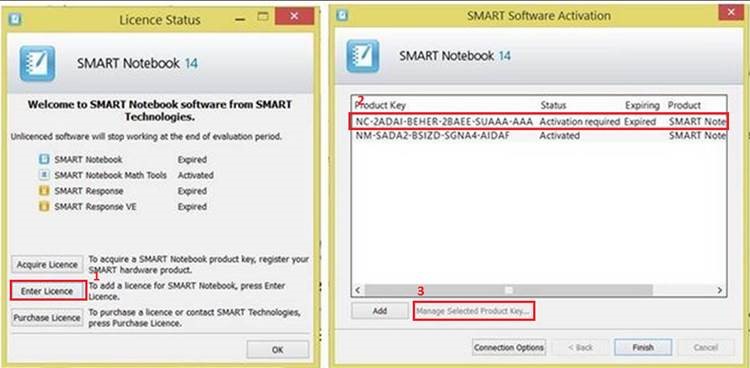
If you get the prompt that your SMART Notebook key has expired, please follow these instructions:

  • click on Enter Licence
  • click on the top one that says Activation required.
  • You can then click on Managed Selected Product Key
  • I don’t have the next screen shot right now, but you should then tick the box to Agree to the Licence and click OK(or Next)
  • Select the option to activate automatically (1st one)
SMART Expiration


Thank You Alison

Standard

Over the break Alison updated/cleaned all the desktops and SMART Boards.  Please continue to use only the SMART pens on the boards and turn off all equipment at the end of the day.

IT Summer Work and What’s New for Next School Year

Standard

We’re nearly there!!!  Over the summer there will be lots of changes taking place.  Some are still in the initial planning phases or waiting for budget decisions.  However, to ensure you are kept in the picture and there are no sudden surprises, here is the current plan:


    • Upgrade to Moodle 2.4 *details coming shortly
    • P drives unavailable to students starting next school year from Grades 9-11 and faculty and Grade 12 as of October
    • Current folders in Classworks special projects will be deleted


  • iPads – curricular sets and individuals – will be collected before CWW trips but will be available during CWW exhibition upon request.  
  • Desktops will be replaced with new All in One desktops running Windows 7 and have the same software.
  • All the old SMART Boards and beamers will be replaced with a SMART Board like the one currently in rm 104.
  • Removal of SMART Board in the upstairs of the library
  • Tablet return for non-returning faculty and end of lease machines will be collected no later than Friday 14 June. *if this applies to you, you will be contacted with more detailed information
  • Student portfolios on blogs.zis.ch will be refreshed including adding the Class of 2017 into the Upper School navigation structure
  • Recording studio ready for use in semester 1
  • Four new classrooms ready for use 
  • Prepare tablets for new faculty and students


SMART Board Training This Thursday

Standard

WHAT: SMART Board training

WHEN:  This Thursday @ lunch

WHERE: rm104

WHY: Because likely these new “rolls royce  of digital whiteboard technology will be in your  classrooms next year.  Do you want to know how you can best use them to help your students learn?


New Screens Large and Small

Standard

Two new display options arrived on campus over break:

  1. one very large, multi touch new SMART Board in rm 104
  2. three very small pocket projectors 


In the coming days we will be hosting lunchtime PD opportunities to play with both new projection options.

BIG Ed. Tech Decisions Coming Shortly

Standard
 In the article Technology is Not Neutral (Stager, 2013) outlines the need for us to  think of technology  as cognitive tools, an essential viewpoint for our upcoming decisions
Come up to the blob table and play with the Light SMART Raise Beamer with this BIG question in mind:
                             How will this impact teaching and learning?  
Please write your feedback on the whiteboard or this digital boardhttp://padlet.com/embed/nmxlchq4c

If the SMART pen and projector remote is not out it is in Amy’s office.

 *PLC time this week will be devoted to formal feedback in curriculum areas regarding the ideal digital classroom eco system, overview of next phase of 1-to-1, and a few observations from Liz about current student tech usage.