New Features in Google Classroom

Standard

As of mid August the following in now possible in Classroom:

  • Guardian summaries: Teachers and administrators can invite guardians to sign up for email summaries to keep up with their students. Guardians can choose how often to get a summary—daily or weekly—and can unsubscribe at any time. Summaries include a student’s missing or upcoming work as well as new announcements and questions posted by teachers in the class stream.

  • Topics for stream organization: Teachers can organize the class stream by adding topics to posts. Teachers and students can filter the stream by topic.

  • Teachers and students can preview materials attached to assignments or posts.

  • Teachers and students can view email notifications by class using Inbox by Gmail. Important updates from recent emails are highlighted in each bundle.

  • Teachers can add a subject when creating a class. (What’s New in Classroom Blog)
Google Classroom

Standard

First a VERY BIG thank you for your efforts over the past few weeks with Google Classroom. 88% of faculty members participated in PD last week!

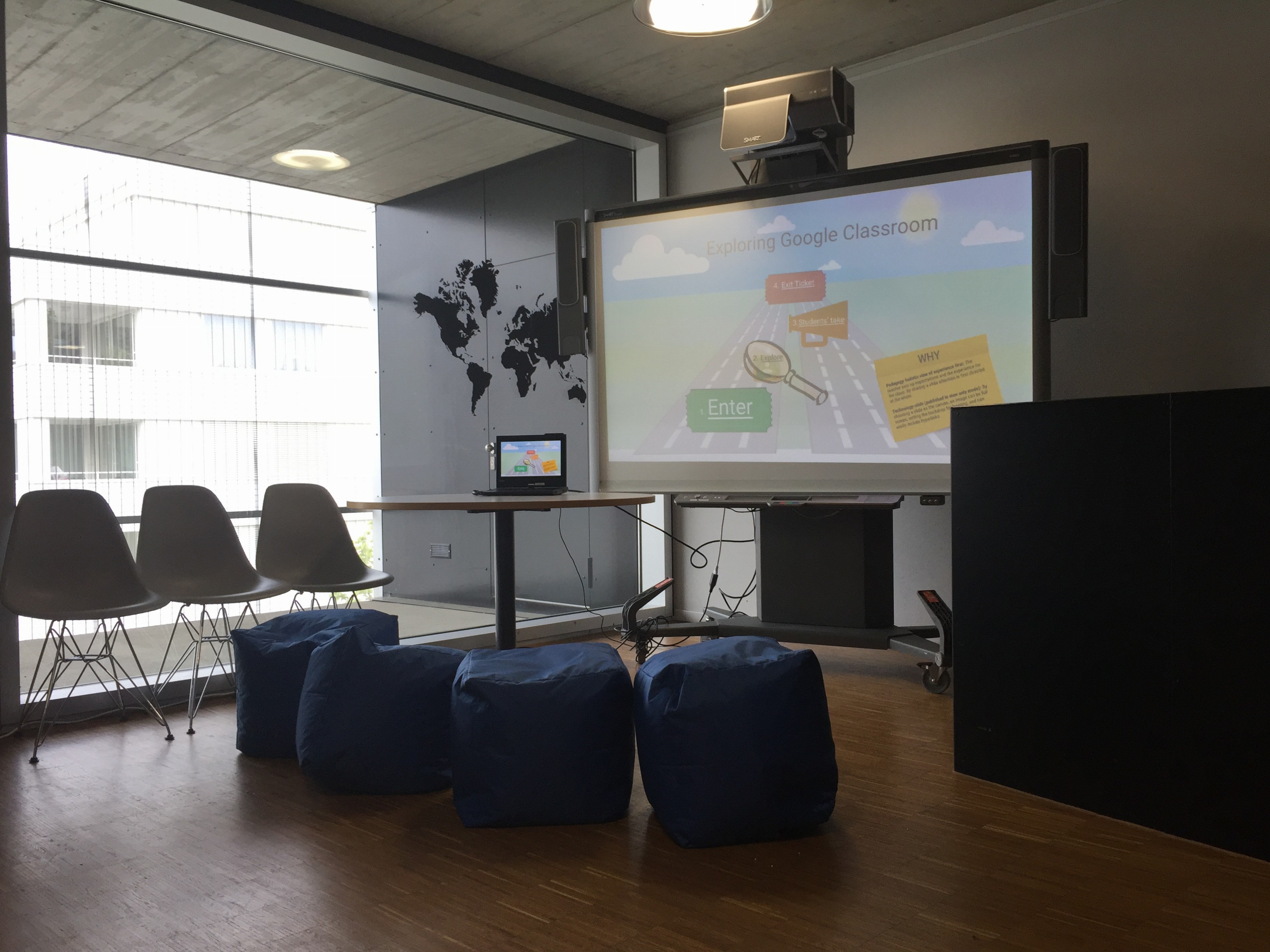
May 20th and 27th teacher trainers and Liz will be on hand to answer any specific questions you might have. We will meet outside the faculty room at the portable SMART board.

Below are all the Google Classroom resources that have been sent out over the past month in case you need them for reference:

1) Google’s online training center

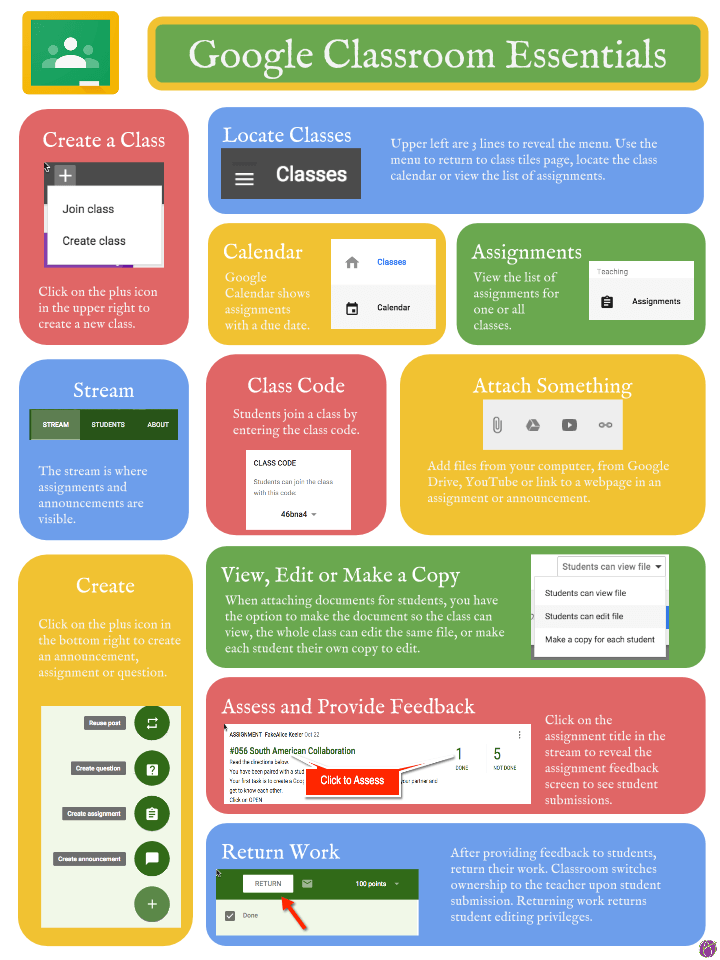
2) Handy infographic for understanding the Classroom interface

Google-Classroom-Essential-Infographic-Alice-Keeler

3) ZIS Upper School Classroom exploration roadmap

Google Classroom PD

Standard

The explore Google Classroom station is now ready:) File_000It will be up for the month of May to help you get ready for the change communicated last week. Stop by to play, explore and learn.


If you have indicated you would like specific help (one-on-one) watch out for an email from Liz later today. The following group sessions will run next week, please RSVP below:


Below is an interactive template you can explore on your own, but it’s recommended that you explore classroom with a partner to be learn both the teacher and student perspectives. If you need a student to help you explore some are on hand ready and excited to help you.


Are you Device Independent?

Standard

green_gd_challContinuum_techtoolflexibility
By now you should know that you can work with Google Drive in two places on any device (the cloud and the desktop/within app downloaded) and have supported students in advisory to do so during the recent road checks. To keep with our Upper School edtech goal of streamlining communication we are holding a contest.

The first five faculty/staff members to show Alison, Liz or Mike zero Google drive items synced down to their yoga and at least 20GB free on their C disk will be awarded prizes.

at least twenty free


Google Educator Certification

Standard

We have been a Google apps school for over eight years. Officially used Google Drive since Oct. 2013 and Gmail/Calendars for over six months. By now you should be able to navigate in this world comfortably and help your students make appropriate tool and communication workflow choices.  If you feel like you would like a little help, the new Google Educator training system is full of scenarios that are specifically designed for teachers by teachers to help gain skill and understanding about effective use. Such as:

Screen Shot 2016-01-26 at 2.15.23 PM

If you wish to take a certification course please email Liz and she will help get your signed up courtesy of the IT department PD budget;)

Goobric w/ Doctopus- Add Rubrics Straight to Google Docs

Standard

Rubric based feedback is a proven way to clarify what is expected from students, however when work is produced digitally adding a rubric to a students work itself can be a multistep process. Three powerful tools connect and streamline this feedback loop.


Speech to Text Worth Rethinking

Standard

Voice tools are expanding and transforming access to learning in the auditory realm like never before.

The speech to text tool within Google Drive has dramatically improved.  Below are a few ways you might want to consider using it to enhance the ways you give students feedback, or student learning. Speech to text is also useful for students that are auditory learners.

  • Voice comments for feedback-Consider replacing your red pen or written comments for conversational style feedback
  • Voice comments for conversation- Get a thread going between you and your students within the actual document they are working on
  • Provide auditory input for students outside of class-For language learners, pronunciation and word choice is often tricky. By capturing your voice they can replace your voice as many times as necessary, something that in class would be quite awkward for you and the students:)

TRY IT and add your voice comments within this Google doc.


*Screencastify is a solid screencast tool that saves straight to Google drive.